Distributed task queues
Promgen uses Celery as a distributed system to handle asynchronous tasks such as sending alert notifications (see: Alert Worker) or pushing updates to Prometheus (see: Worker Model (Push)).
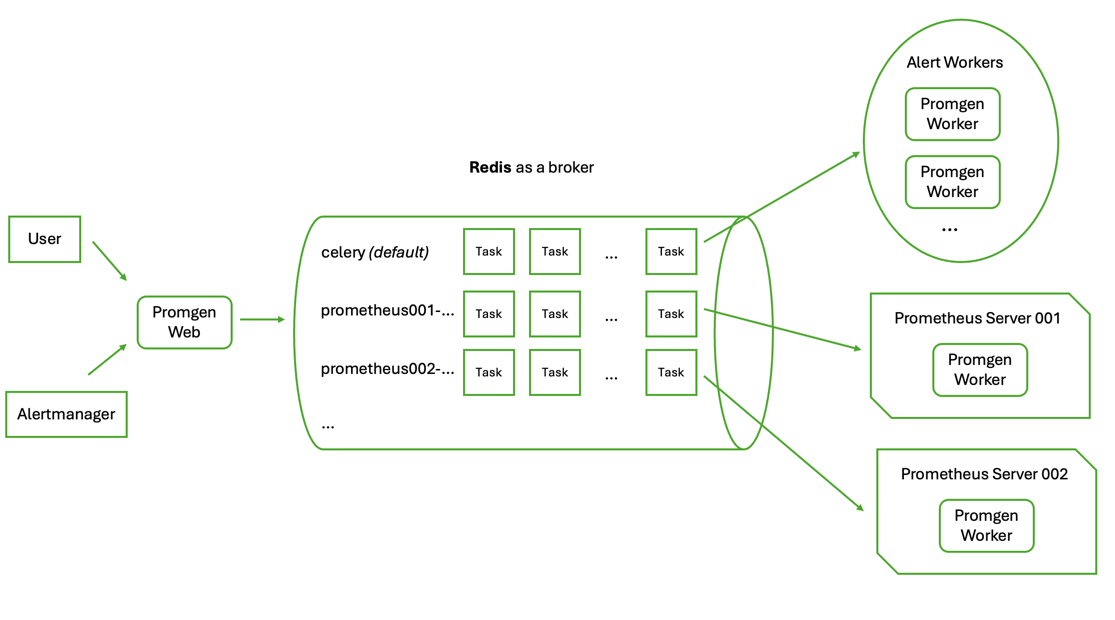
Tasks are sent to workers using Redis as the message broker. Tasks that relate to a specific Prometheus server, such as writing configuration files and reloading Prometheus, are sent to a queue named after that server. Other tasks, such as sending alert notifications, are sent to a default queue named “celery”.
Retrying Timed Out Tasks
Tasks that process for too long are automatically retried after a timeout period to avoid stuck tasks. The timeout period is currently set to 30 seconds, but this can be adjusted by modifying the CELERY_TASK_SOFT_TIME_LIMIT setting in the Promgen configuration.
Tasks that time out will be retried indefinitely until they succeed. This ensures that important tasks, such as sending alert notifications, are not lost due to temporary issues. The delay between retries increases exponentially to avoid overwhelming the system.
The Dead-letter Queue
By default, too many retried tasks can lead to a backlog of tasks in the queue, which can cause delays in processing new tasks. To mitigate this, Promgen implements a dead-letter queue mechanism. If the CELERY_ENABLE_PROMGEN_DEAD_LETTER_QUEUE setting is enabled, retried tasks will be moved to a separate dead-letter queue named “promgen_dlq” instead of sending them back to the original queue. This allows administrators to inspect and handle failed tasks separately without affecting the processing of new tasks.
By default, this setting is disabled. After you enable it, you can set up a separate worker that listens to the “promgen_dlq” queue to handle retried tasks by using the following command:
celery -A promgen -l info --queues promgen_dlq