Better configuration change workflow with Git-to-CD mirroring
Making a configuration change is often a risky business. Pushing an invalid configuration change can cause your service to malfunction even if zero line of code is changed. To reduce the chance of outage due to incorrect configuration changes, you would want them reviewed by many eyes before they are applied.
Modern source code hosting services such as GitHub and GitLab have a notion of pull request. What if we use pull requests for configuration changes just like we do for source code, given the importance of service configuration?
With Central Dogma's periodic Git repository mirroring, you can set up the following workflow in your organization:
-
Humans work on a Git repository to manage the configuration files.
- Store the configuration files in a Git repository.
- Send a pull request that updates the configuration files.
- The pull request is reviewed and merged.
-
Applications work on a Central Dogma repository to retrieve the configuration files.
- Central Dogma mirrors the configuration files in the Git repository into a Central Dogma repository.
- Applications watches the configuration files in the Central Dogma repository.
Note that the applications do not access Git repositories directly. There are a few good reasons to make your applications access Central Dogma repositories instead:
- Source code repositories are often hosted in a different network.
- Source code repositories are not always highly-available, although they may be backed up regularly.
- Central Dogma repositories are highly-available, queryable and watchable.
Setting up a mirror
First, you need to create a credential to access the Git repository. You can create a project-wide credential via project settings or a repository-specific credential via repository settings.
Currently, you can use SSH key authentication, password-based authentication, or access token-based authentication.
Setting up a mirroring task
You can set up a mirroring task via repository settings.
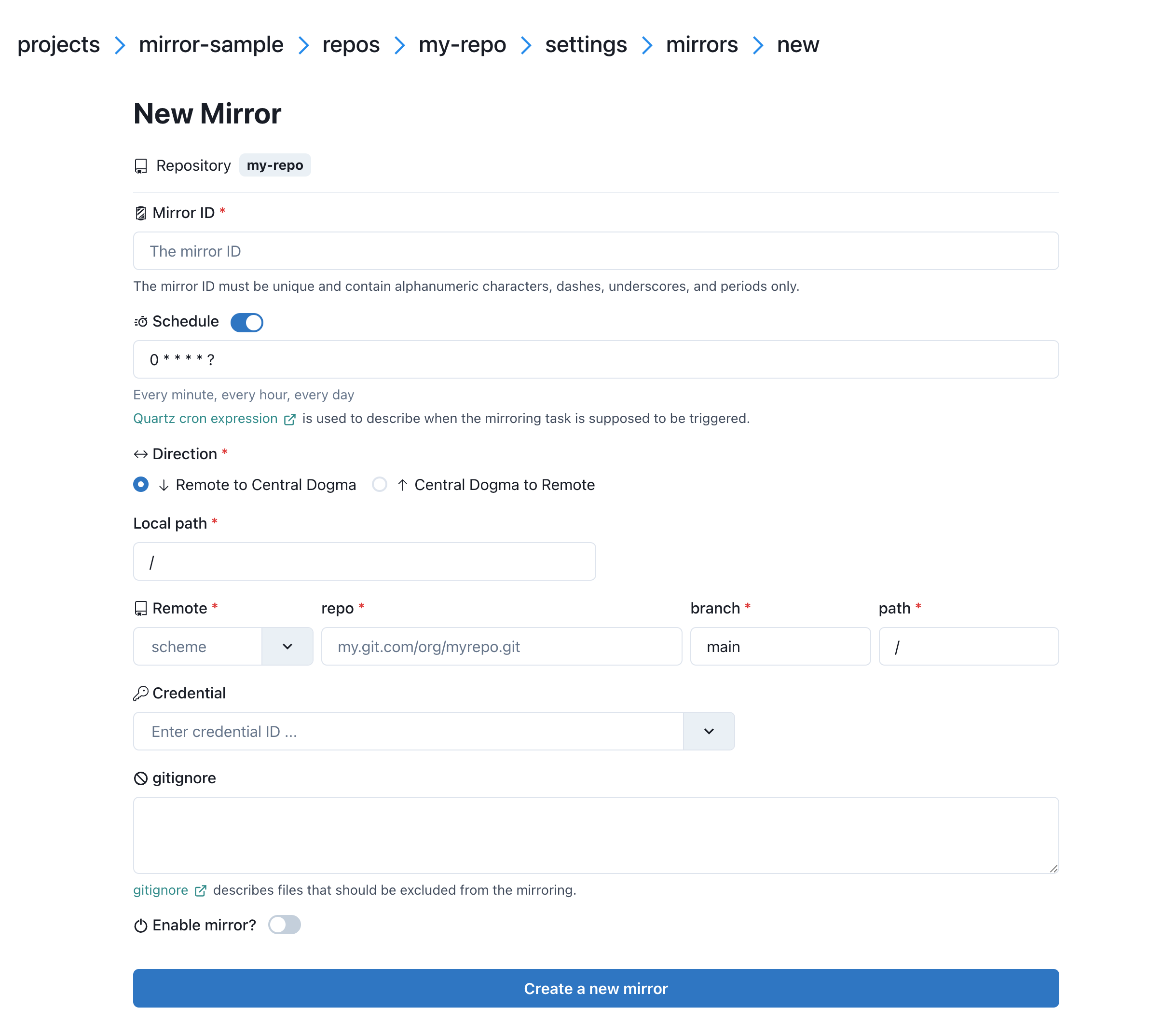
Here is the properties of the mirroring task:
-
Mirror ID- the ID of the mirroring task. This must be unique in the repository.
-
Schedule- a Quartz cron expression
that describes when the mirroring task is supposed to be triggered. If unspecified,
0 * * * * ?(every minute) is used.
- a Quartz cron expression
that describes when the mirroring task is supposed to be triggered. If unspecified,
-
Direction- the direction of mirror.
-
Local path- the directory path. The content of the
remote pathwill be mirrored into this directory. If unspecified,/is used.
- the directory path. The content of the
-
Remote-
Supported schemes are:
git+httpgit+httpsgit+ssh
-
Use
git+httponly for public repositories that require no authentication. Never send a password or access token overgit+http. Usegit+httpsorgit+sshfor authenticated repositories. -
repo- the uri of the remote Git repository except the scheme.
e.g.
github.com/foo.git
- the uri of the remote Git repository except the scheme.
e.g.
-
branch- the branch name of the remote Git repository. If unspecified, the default branch of the remote Git repository is used.
-
path- the path of the remote Git repository. If unspecified, the whole content of the remote Git repository is mirrored.
-
-
Credential- the ID of the credential to use for authentication.
-
gitignore- a gitignore specifies files that should be excluded from mirroring.
The type of gitignore can either be a string containing the entire file (e.g.
/filename.txt\ndirectory) or an array of strings where each line represents a single pattern.
- a gitignore specifies files that should be excluded from mirroring.
The type of gitignore can either be a string containing the entire file (e.g.
-
Zone(Displayed only ifzonein the configuration is configured)-
the zone where the mirroring task is executed.
-
If unspecified:
- a mirroring task is executed in the first zone of
zone.allZonesconfiguration. - if
zone.allZonesis not configured, a mirroring task is executed in the leader replica.
- a mirroring task is executed in the first zone of
-
-
Enable mirror- whether the mirroring task is enabled.
Central Dogma to Central Dogma mirroring
In addition to Git-to-CD mirroring, Central Dogma supports mirroring between two Central Dogma servers. This is useful when you want to replicate configuration across multiple Central Dogma clusters, such as syncing configurations between different environments or regions.
Setting up a CD-to-CD mirror
The setup is similar to Git mirroring, with a few differences:
-
Remote-
Supported schemes are:
dogma- connects to a remote Central Dogma server via plain HTTP.dogma+https- connects to a remote Central Dogma server via HTTPS.
-
Use
dogma+httpsoutside localhost or local development. When an access token is configured, never send it overdogma. -
repo- the URI of the remote Central Dogma repository.
The format is
<host>[:<port>]/<project>/<repository>.dogma. e.g.my-cd.com:36462/myproject/myrepo.dogma
- the URI of the remote Central Dogma repository.
The format is
-
path- the path within the remote Central Dogma repository. If unspecified, the whole content of the remote repository is mirrored.
-
Unlike Git mirroring, the
branchfield is not used because Central Dogma has no notion of branches.
-
-
Credential- the optional ID of an access token credential for a remote Central Dogma server that requires authentication.
Use the credential only with
dogma+https.
- the optional ID of an access token credential for a remote Central Dogma server that requires authentication.
Use the credential only with
-
DirectionREMOTE_TO_LOCAL: Replicates files from a remote Central Dogma repository to the local repository.LOCAL_TO_REMOTE: Pushes files from the local repository to a remote Central Dogma repository.
-
gitignore- gitignore patterns are also supported for CD-to-CD mirroring, allowing you to exclude specific files from being mirrored.
All other properties (Mirror ID, Schedule, Local path, Zone, Enable mirror) work the
same way as in Git mirroring.
Mirror limit settings
Central Dogma limits the number of files and the total size of the files in a mirror for its reliability.
As your configuration grows, you may want to bump the limit. See the configuration guide
to learn about the options related with mirroring: numMirroringThreads, maxNumFilesPerMirror and
maxNumBytesPerMirror.